Best Typing Games for School: Learn to Type Fast & Free
Every student knows the feeling: you're staring at a blank document, fingers hovering over the keyboard, and your thoughts are moving twice as fast as your hands. Typing speed matters more than ever — in class, on tests, in life. The good news? Playing typing games for school is one of the most effective (and genuinely fun) ways to fix that. No special software, no downloads, no cost. Just open a browser tab and start practicing.
This guide covers the best free typing games you can play right now — on a school computer, a Chromebook, or at home. Whether you're just learning where the keys are or already typing 40 WPM and want to push further, there's something here for every level.
Why Typing Games Help Students Learn Faster
Traditional typing drills are effective, but boring. You repeat "asdf jkl;" for ten minutes, your brain goes on autopilot, and you learn almost nothing. Games work differently. When there's a challenge, a score, a timer, or a puzzle to solve, your brain stays engaged — and that's exactly when learning sticks.
Here's what research and classroom experience consistently show:
Immediate feedback loops. In a typing game, you see your mistakes the instant they happen. You pressed the wrong key and the word turned red — your hands notice, your eyes notice, and your brain forms a correction faster than any worksheet could trigger.
Repetition without boredom. Good typing games are designed to make you type the same patterns hundreds of times without noticing. You're focused on winning, not on the repetition itself.
Speed AND accuracy together. Many games reward accuracy as much as speed, teaching students that rushing and making errors is slower than typing carefully. That's a lesson that takes months to learn through traditional drills.
Vocabulary boost as a side effect. Word-based games don't just build typing skill — they expand vocabulary at the same time. Students who play word games regularly tend to read and write more confidently overall.
Low pressure, high motivation. Unlike a timed school typing test, a game feels like a choice. That shift in mindset — from obligation to play — changes how students approach the keyboard entirely.
The best starting point is a game that tests where you actually are right now. Keyboard Typing Test does exactly that: it measures your real-time WPM and accuracy, shows which keys you're hitting wrong, and adapts the challenge as you improve. Five minutes a day with this game and you'll see your speed climbing within a week.
Keyboard Typing Test
Staring at a blank screen while your motivation slowly slips away is a universal struggle during a long day at the desk. Keyboard Typing Test provides...
▶ Play FreeBest Typing Games to Play at School
These are the games that genuinely build typing skill while keeping students glued to the screen. All of them run in any modern browser — no installs, no accounts required, and most work on school networks without any issues (they're essentially unblocked typing games for school by design, since they're hosted as standard web content).
Keyboard Typing Test
Already mentioned above, but worth repeating: this is the gold standard for measuring real progress. It gives you a clean WPM score, tracks accuracy, and highlights your weak keys. Great for the beginning and end of a practice session to measure how much you've improved.
Words from Words
This one is clever. You're given a long word and challenged to form as many smaller words from its letters as possible — and to do it fast. The typing element here is real: you're building muscle memory for common letter combinations (ing, -tion, -er, -est) that appear constantly in English writing. Students who play this regularly start to notice they can type common word endings without thinking.
Words from Words
Language is a vast playground where even a single long noun hides dozens of shorter secrets waiting to be unlocked. Words from Words challenges your v...
▶ Play FreeCryptogram: Words and Codes
Cryptogram takes a different angle. Letters are substituted with codes, and you type in the real letters to reveal the hidden message. It sounds simple, but the mechanics are deeply satisfying — and the typing practice is built right into the puzzle-solving. Students end up typing far more than they intended because they want to finish the puzzle. It's also excellent for building pattern recognition between letters and positions on the keyboard.
Cryptogram: Words and Codes
Cracking secret codes is one of the most intellectually satisfying ways to sharpen your focus during a quick break. Cryptogram: Words and Codes turns ...
▶ Play FreeCrossword — Make a Word from Letters
Classic crossword format meets typing challenge. You see the grid, you see the clue (or the jumbled letters), and you type your answer. The constraint of fitting words into specific boxes forces precision — you can't just get the gist of the word right, you need every letter. For students who already type at a basic level, this is a great way to push accuracy without slowing down speed.
Crossword - Make a word from letters
Staring at the clock during a slow afternoon is the worst, but a quick mental escape can turn your entire day around. Crossword - Make a word from let...
▶ Play FreeWords Crosswords
Similar to the game above but with a different mechanic: you're given a set of letters and need to form words that fit specific crossword patterns. The challenge ramps up quickly as the word lengths grow. This game is particularly useful for intermediate students because it requires both vocabulary recall and fast, accurate typing to complete before the timer runs out.
Words Crosswords
Language is a vast landscape of hidden patterns that reveals itself the moment you start connecting random characters into meaningful sequences. Words...
▶ Play FreeMore Great Options
Beyond the featured five, here are more games worth bookmarking:
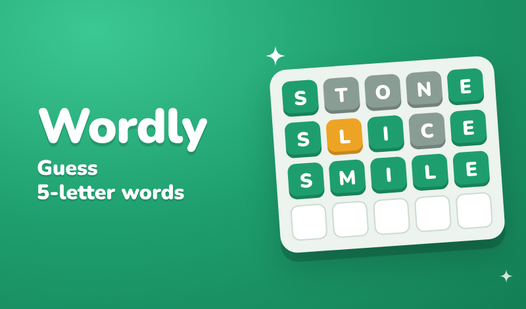
Wordle: Guess the words from 5 letters — The classic guessing game. You have six attempts to identify a five-letter word, typing your guesses each round. It's light on pure speed practice but excellent for letter recognition and word pattern awareness.
Wordle: Guess the words from 5 letters
Crack the code by guessing hidden five-letter terms using your sharp wit and refined vocabulary. You enter a word to test your luck, receiving color-c...
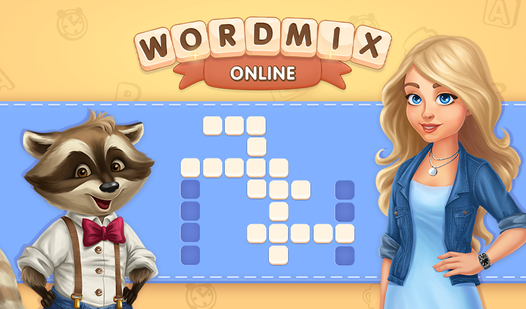
▶ Play FreeWordmix Online — A fast-paced word scramble where you unscramble letters against a timer. Excellent for building quick thinking alongside typing reflexes.
Wordmix Online
Connect letters in the correct sequence to reveal hidden vocabulary and clear the board in Wordmix Online. This addictive puzzle experience challenges...
▶ Play FreeSea of Words — A visually unique game where words float toward you and you need to type them before they reach the edge. Classic typing-action hybrid that builds speed under pressure.
Sea of Words
Fans of stimulating brain teasers will find Sea of Words to be the ultimate companion for daily mental sharpening. This engaging word game puts your l...
▶ Play FreeHow to Improve Typing Speed With Browser Games
Playing games is half the equation. The other half is playing them intentionally. Here's how students can get the most out of browser-based typing practice:
Set a daily time block
Even 10–15 minutes of focused practice beats an hour of distracted clicking. The best results come from consistent short sessions rather than occasional marathons. Try scheduling it right before homework — your typing speed while doing assignments will improve noticeably within a few weeks.
Focus on accuracy before speed
This is the single most common mistake beginners make. They race through games to get a high score and end up reinforcing bad habits: incorrect finger placement, looking at the keyboard instead of the screen, and typing with only a few fingers instead of all ten.
Set a personal rule: if your accuracy in a game drops below 90%, slow down. Speed comes naturally once your fingers know where to go without thinking.
Target your weak keys
Every typist has them — the keys they consistently miss, hesitate on, or look down for. Use Keyboard Typing Test specifically to identify yours, then choose games that force you to use those keys frequently. Games involving uncommon letters like Q, X, and Z are particularly useful for building full-keyboard confidence.
5 Letters Wordle is a good choice here — the five-letter constraint means you'll encounter a wide spread of letters across sessions, including the tricky ones.
5 letters wordle
Guess the hidden mystery word by strategically testing combinations of letters in 5 letters wordle. Every time you submit a guess, the game provides c...
▶ Play FreeTrack progress over time
Numbers are motivating. Before and after each week of practice, take a proper typing speed test and record your WPM and accuracy. Students who track their progress are significantly more likely to keep practicing, because they can see the improvement happening.
Mix games to avoid adaptation
Your brain is efficient — it adapts to whatever you practice most. If you only play one typing game, you'll get excellent at that specific game format but less improvement in general typing. Rotate between at least two or three different games each week to keep the skill transfer broad.
Typing Games for Different Skill Levels
Not all typing games are equal, and choosing the right difficulty matters. Here's how to match games to where students actually are:
Complete Beginners (under 20 WPM)
At this level, the goal is finger placement, not speed. Beginners need games that reward accuracy above all else and don't create panic with fast timers.
Tiny Words is perfect here. Short words, clear layout, low pressure. Students can focus on finding each key without stress, and the game progresses gently.
Tiny Words
Word enthusiasts and puzzle fans will find endless delight in the soothing challenge of Tiny Words. This clever twist on the classic mahjong solitaire...
▶ Play FreeSolitaire: Word Categories is another gentle option — the card-game format removes the time pressure entirely, letting students type at their own pace while still building vocabulary and keyboard familiarity.
Solitaire: Word Categories
Sort word cards into logical groups to clear the board in Solitaire: Word Categories. This clever twist on traditional card games replaces suits with ...
▶ Play FreeIntermediate Typists (20–45 WPM)
At this stage, students know the keyboard but haven't built reliable speed yet. They need games that challenge them to type faster without sacrificing the accuracy habits they've developed.
Words with Hints hits the right level here — you get partial clues to guide you, but you still need to type full words quickly. It reduces the cognitive load of vocabulary recall so students can focus on their fingers.
Words with hints
Connect letters across the grid to clear the board and master this addictive brain training experience. Words with hints challenges you to uncover hid...
▶ Play FreeWordmix Online also works well for intermediates. The scramble mechanic forces quick thinking and fast typing simultaneously, which is exactly the combination that pushes WPM upward.
Advanced Typists (45+ WPM)
Students at this level don't need to learn the keyboard anymore — they need to push past mental barriers and build consistency under pressure.
The most effective approach here: return to Keyboard Typing Test with a strict personal challenge. Set a target (say, 60 WPM at 98% accuracy) and don't consider a session successful until you hit it. Then raise the bar.
Cryptogram: Words and Codes also challenges advanced typists differently — the puzzle-solving element keeps the brain engaged in a way that pure speed tests don't, and the unusual letter combinations in encoded text prevent your fingers from running on autopilot.
Classroom Tips: Making Typing Games Work in School
A few notes for students (and teachers) who want to use these games as part of structured learning:
Start sessions with a baseline test. Before playing for fun, spend two minutes on a typing speed test. This anchors the session in improvement rather than just entertainment.
Use games as rewards. Finish your work? Ten minutes of typing games. This reframes practice as a treat, not a task — and students who see it that way practice more.
Partner challenges. Two students competing on the same game is more motivating than either playing alone. It's still skill-building, but now there's social pressure to perform.
School Chromebooks work perfectly. All the games listed here run in Chrome without any plugins or extensions. If your school blocks certain gaming sites, note that FreeJoy.games is designed as an educational game platform — most school network filters recognize it as appropriate content.
Word games count as ELA practice. Games like Words from Words, Cryptogram, and Wordle are directly building vocabulary and word recognition skills that transfer into reading and writing performance. These aren't just typing games — they're language games.